Official Torzon directory — torzondarknetlinks.com

Wallet & flow

Torzon escrow & BTC/XMR

How BTC/XMR, escrow, and disputes work on Torzon — read before your first deposit. Balances live only inside Tor on a verified mirror from Links.

ESCROW_PREVIEW DEMO
DEMO BALANCE
1,250CR

Demo only — real wallet is inside Torzon on Tor

1Created250 CR
2LockedIn review
3ResolutionPending
250 CR are held in escrow (demo). Choose release or dispute to see the next state.
01

Deposit (BTC / XMR)

Preload BTC/XMR or pay a one-off invoice at checkout. Usually 1 BTC conf and ~10 XMR conf — the screen inside Torzon is what counts, not this note.

02

Escrow lock

Funds stay locked while the vendor works. Many orders auto-finalize after about 14 days unless you dispute — wording is on the order page.

03

Disputes

Mods read what you upload on-site. PGP logs help if mail gets messy.

04

Finalize early

Some vendors push finalize-early. If you are new, stick to normal escrow.

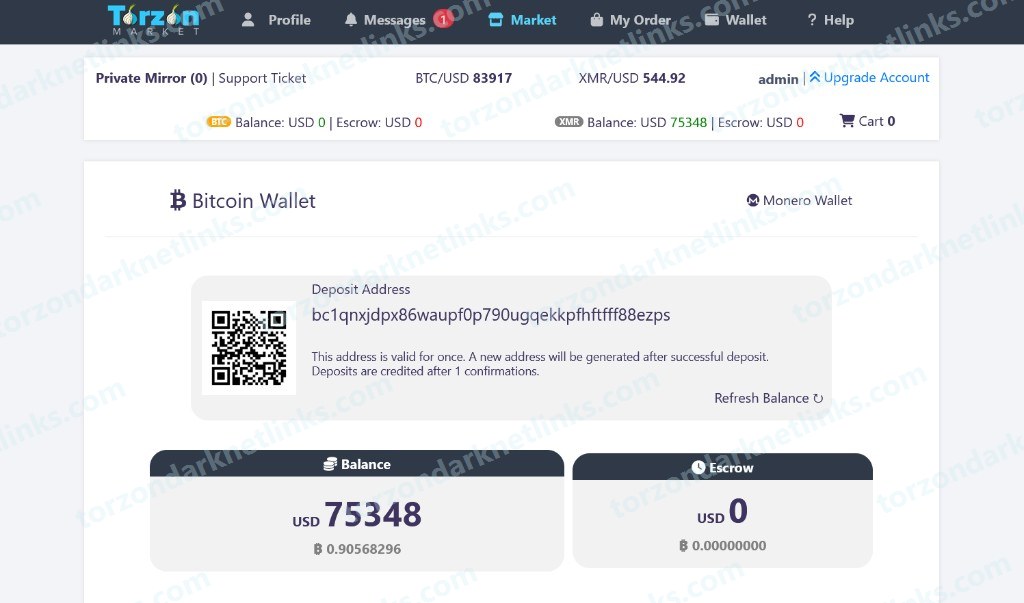
Torzon Market Bitcoin wallet screen with deposit address and balance summary
In-market BTC wallet (deposit address rotates — use only inside Torzon)

Balance vs escrow inside Torzon

Balance is spendable XMR or BTC. Escrow is locked on open orders until you finalize, auto-finalize fires, or a dispute closes. The UI often shows USD on top with coin amounts below — read the live screen, not this summary.

Deposits

Session deposit addresses rotate; QR codes are single-use per top-up. Reusing an old address may require a support ticket for manual credit. Minimum withdrawal thresholds apply inside the market wallet UI.

Membership tiers (reference)

  • Basic — standard access; limited escrow extensions.
  • Basic-Plus — stealth browsing (hidden thumbnails), extra escrow extensions, daily raffle ticket.
  • Premium — priority disputes/inbox placement; private mirror perk after several completed orders.

Disputes

Buyer opens a ticket with evidence (tracking, screenshots, PGP threads). Auto-finalize pauses immediately. Staff review typically within about 72 hours. Multisig escrow may apply on high-value orders per market policy. Torzon Darknet Links does not hold funds — any “verification payment” on the open web is fraud; mirrors only on Links.

Checkout paths

Wallet balance vs direct pay

Both routes use Torzon escrow — this page describes behavior; only the in-Tor wallet UI is authoritative.

Pre-funded balance

Deposit BTC or XMR once, then spend against multiple orders. Useful if you buy often and accept address rotation on each top-up. Confirmation counts still apply before funds move from pending to spendable.

Walletless invoice

One deposit address per checkout without keeping a standing balance. Escrow timing and finalize rules match funded orders — see the order screen inside Torzon for the exact timer.

Withdrawals and fees

Vendors and buyers withdraw through Torzon’s wallet tab after orders complete or bonds release. Network fees follow coin choice; minimum withdrawal amounts display in Tor. torzondarknetlinks.com never shows live deposit addresses — any QR code on the clear web is a scam.

Finalize-early (FE)

FE releases escrow before delivery confirmation. Torzon may grant FE only to vendors with history under market rules. If you are new, decline FE requests and stay on standard escrow ( About covers vendor tiers).

Before your first deposit

  1. Confirm you logged in through a host from Links that passed the verifier.
  2. Read confirmation requirements (1 BTC / ~10 XMR) on the deposit screen in Tor.
  3. Send a small test amount if you are unsure about address rotation.
  4. Keep dispute evidence on-platform — escrow pauses when a ticket is open.
Mirror address copied